
Operating instructions

10
2.7 Connecting a recorder
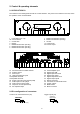
Connect the recorder’s output to one of the inputs (18). The inputs of the recorder must be connected to the
fixed level outputs (23).
2.8 Connecting processors / equalizers
Connect the processor’s outputs to the inputs main in (25). The inputs of the processor must be connected to
the outputs pre out (24). Additionally You must activate the processor loop (see 4.13)
2.9 Connecting subwoofers
Active subwoofers
If you use an active subwoofer (with built in power amplifier), simply connect it's inputs to the unit's pre out
(24) and adjust the bass level at the subwoofer. If the subwoofer has a trigger input, connect it to the trigger
output (32, see also chapter 2.2).
Active subwoofers with built in cross over
Most active subwoofers have a built in frequency divider network. They receive the full range signal from the
amplifier and feed the filtered signal (full range minus bass) back. This kind of subwoofer can be connected
to the processor in / output: Connect the subwoofer's inputs to the pre outputs (24) and the subwoofer's
outputs to the main inputs (25). Additionally You must activate the processor loop (see 4.13)
If the subwoofer has a trigger input, connect it to the trigger output (32, see also chapter 2.2).
2.10 Connecting the loudspeakers
INSPIRATION C8
Connect the speakers to the speaker terminals (19). Use only good speaker cables with sufficient diameter.
Make sure, that the red terminals are connected to the red or “ + “ terminals of the speakers and the black
terminals to the black or “ – “ terminals of the speakers.
EVOLUTION C9
The C9 has two switchable speaker outlets. Connect one pair of the speakers to the speaker terminals (19a),
the other one to the terminals (19b). Use only good speaker cables with sufficient diameter. Make sure, that
the red terminals are connected to the red or “ + “ terminals of the speakers and the black terminals to the
black or “ – “ terminals of the speakers.
The outputs can be activated or deactivated via the menu (see 4.12)
2.11 Tuner antenna
Connect the Antenna cable to the antenna socket (16)