
Operating Instructions and Installation Instructions



FRITZ!Box 3370 10
LEDs
2.3 LEDs
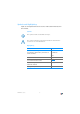
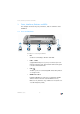
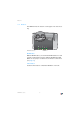
Five LEDs are built into the top of the FRITZ!Box 3370, which
flash or light up to display various connection statuses and
events.
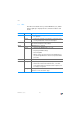
LED Condition Meaning
Power on
• Device has electrical power and the DSL line is ready
for operation
flashing
• Device has electrical power and the connection to DSL
is being established or has been interrupted
LAN on Network connection is active to at least one connected de-
vice (network adapter or hub/switch)
WLAN on WLAN function is enabled
flashing
• Switching the WLAN function on or off
• Adopting the WLAN settings
• Performing WPS
• WPS procedure aborted: More than two WLAN devices
are performing WPS at the same time. Repeat the WPS
procedure.
DSL on Internet connection is active
Info flashing
• Updating FRITZ!OS, the firmware of your FRITZ!Box
• Online meter reached the defined value, or another
event defined in the user interface under “System / “In-
fo” Display” is signaled
flashing red Error: Open the FRITZ!Box user interface and follow the in-
structions on the “Overview” page