
Operating Instructions and Installation Instructions

FRITZ!Box 3370 16
Connecting to the Internet
Connecting to the DSL Line
Connecting to a telephone socket
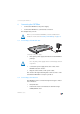
1. Pick up the DSL cable (gray) included in the package.
The cable has an RJ45 connector on both ends.
2. Insert one end of the cable into the socket on the
FRITZ!Box labeled “DSL”.
3. Connect the other end to the socket on the DSL splitter
labeled “DSL” or similar.
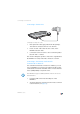
The “Power” LED lights up after a short time to signalize that
the FRITZ!Box is ready for Internet connections over DSL.
Connecting to the Internet via the Mobile
Communications Network
If no other kind of Internet connection is available, you can
use your FRITZ!Box to connect to the Internet via the mobile
communications network. A USB modem for mobile Internet
access (UMTS/HSPA) is required for this.
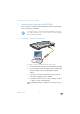
1. Insert the USB modem into the USB port on the
FRITZ!Box.
2. Set up the Internet connection via the mobile communi-
cations network (see page 33).
InfoInfo
DSLDSL
WLANWLAN
LANLA
N
PowerPower
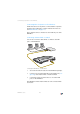
The FRITZ!Box supports UMTS/HSPA modems from various
manufacturers.