
Operating Instructions and Installation Instructions

Connecting the Computer to the FRITZ!Box
FRITZ!Box 3370 17
5 Connecting the Computer to the FRITZ!Box
You can connect a computer with the FRITZ!Box either using a network
cable or wirelessly over WLAN.
5.1 Connecting Computers to the LAN Port
Connecting a computer to the FRITZ!Box using a network cable
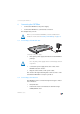
1. Set aside the network cable from the FRITZ!Box package.
2. If you work with a Linux operating system: Configure the
network adapter of the computer with the setting
“DHCP”.
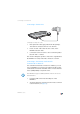
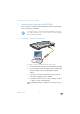
3. Connect one end of the network cable to the network
port (network adapter) of the computer.
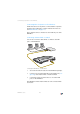
4. Connect the other end to the “LAN 1”, “LAN 2”, “LAN 3”
or “LAN 4” socket on the FRITZ!Box.
Now the FRITZ!Box and the computer are connected to each
other.
A computer can be connected with the FRITZ!Box using only
one of these methods. It is not possible to connect using the
network cable and WLAN.
InfoInfo
DSLDSL
WLANWLA
N
LANLAN
PowerPower