
Operating Instructions and Installation Instructions

Overview: Everything at a Glance
FRITZ!Box 3370 27
6.2 Overview: Everything at a Glance
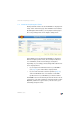
All important information about the FRITZ!Box is displayed di-
rectly on the “Overview” page of the FRITZ!Box user interface.
By clicking the linked entries you can jump from this page to
the corresponding menus and configure settings there.
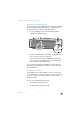
The FRITZ!Box “Overview” page
In the upper area of the window the FRITZ!Box is displayed
with its complete product name, the currently installed ver-
sion of FRITZ!OS, and its current energy consumption.
Depending on your settings, the following additional informa-
tion is displayed here:
• If you assigned an individual name for your FRITZ!Box
(see page 68), this name will be displayed here.
• If you use the automatic search for updates (page 36)
and a new FRITZ!OS version is available on the AVM
Update Server for your FRITZ!Box, you will be notified.
The middle section of the window presents information about
connections, ports and configured convenience functions like
MyFRITZ!, call diversion, guest access, remote access, port
forwarding and push service.