
EmergeTM ECMS2000U Digital Workstation Extender Installer/User Guide


Table Of Contents
- Avocent EmergeTM ECMS2000U Digital Workstation Extender
- List of Figures
- List of Tables
- Product Overview
- Installation
- Operations
- Overview
- Accessing the System
- The Serial Menu
- Configuring Network Settings
- Detecting a Transmitter IP Address
- Authentication
- Flash Upgrading your Emerge Digital Workstation Extender
- Restoring Factory Default Settings
- Resetting the Avocent Emerge ECMS2000U Extender
- Viewing System Information
- Configuring Video Input Settings
- Session Retry Settings
- Audio Performance Settings
- Appendices
10 Avocent Emerge ECMS2000U Extender Installer/User Guide
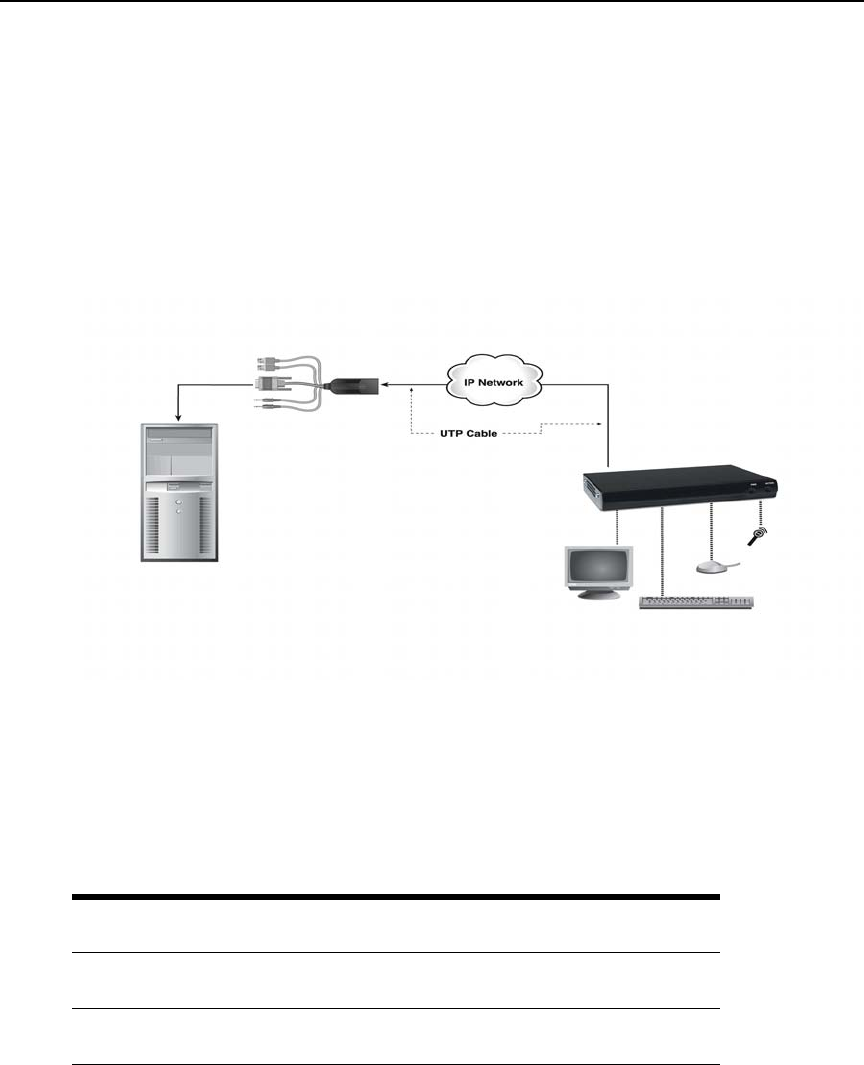
Networked Installation
The following instructions will enable you to install your Avocent Emerge ECMS2000U Extender
in a networked configuration. In this installation, multiple Computer Access Nodes and User
Access Nodes are attached via the same Ethernet network. In this case, it is important for each unit
to be configured with a unique IP address.
Computer Access Nodes and User Access Nodes may be configured for use on a single subnet or
for use across routers. Use of routers, however, will cause a slight increase in end-to-end latencies,
which may not be acceptable for all applications.
Figure 2.4: Networked Installation
The Avocent Emerge ECMS2000U Extender has been pre-configured with factory-default network
settings. If you install only one Avocent Emerge ECMS2000U Extender on a subnet, you do not
need to change these default network settings. If you install multiple units on the same subnet, you
will need to assign a unique IP address to each unit. This can be done via the serial port.
See The
Serial Menu on page 14.
Table 2.1: Default network settings
Component IP Address Type
Default
Gateway
Subnet Mask
User Access
Node
192.168.13.1 static 0.0.0.0 255.255.255.0
Computer
Access Node
192.168.13.2 static 0.0.0.0 255.255.255.0
Computer Access Node
User Access Node
Remote PC