
EmergeTM ECMS2000U Digital Workstation Extender Installer/User Guide


Table Of Contents
- Avocent EmergeTM ECMS2000U Digital Workstation Extender
- List of Figures
- List of Tables
- Product Overview
- Installation
- Operations
- Overview
- Accessing the System
- The Serial Menu
- Configuring Network Settings
- Detecting a Transmitter IP Address
- Authentication
- Flash Upgrading your Emerge Digital Workstation Extender
- Restoring Factory Default Settings
- Resetting the Avocent Emerge ECMS2000U Extender
- Viewing System Information
- Configuring Video Input Settings
- Session Retry Settings
- Audio Performance Settings
- Appendices
Chapter 3: Operations 35
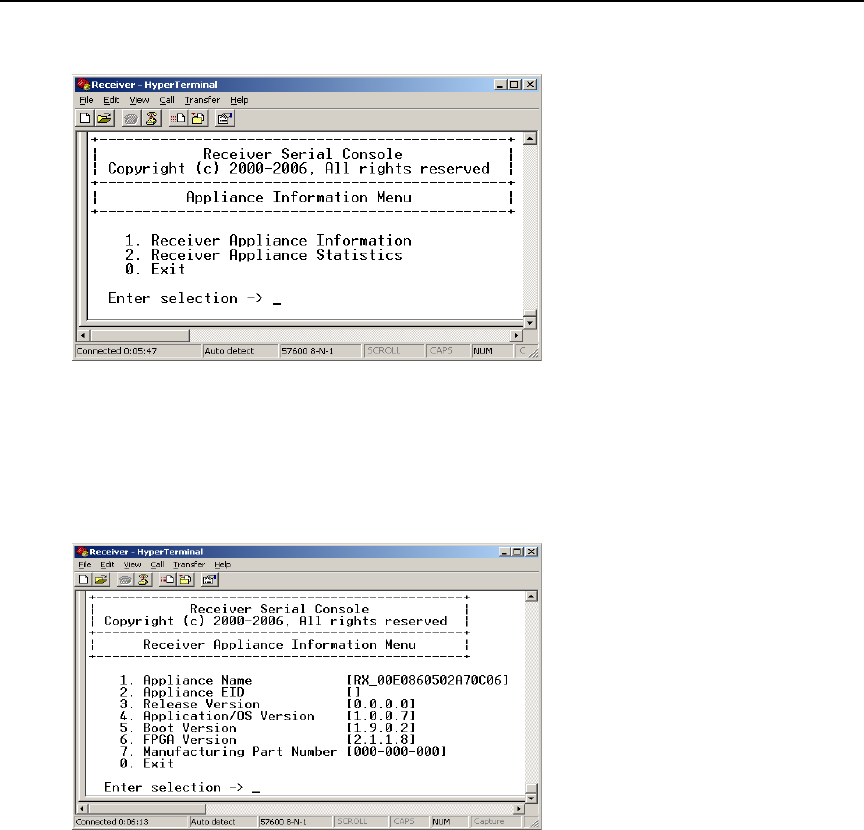
4. Choose Appliance Information. The Appliance Information Menu will appear.
Figure 3.23: Appliance Information Menu
5. Choose Receiver Appliance Information. The Receiver Appliance Information Menu
will appear.
The Receiver Appliance Information Menu screen contains the following information: Receiver
name; EID number; release version; application; boot and FPGA firmware version numbers; and
the manufacturing part number. All values are read-only.
Figure 3.24: Receiver Appliance Information Menu
To view Transmitter system information:
1. Activate the serial menu as described in Accessing the serial menu on page 14.
2. Choose option 2 to access the Transmitter menu. If the password option is enabled, you will be
prompted for a password. See
Authentication on page 24.
3. Type the password and press Enter. The Transmitter Main Menu will appear.
4. Choose Appliance Information. The Appliance Information Menu will appear.