
EmergeTM ECMS2000U Digital Workstation Extender Installer/User Guide


Table Of Contents
- Avocent EmergeTM ECMS2000U Digital Workstation Extender
- List of Figures
- List of Tables
- Product Overview
- Installation
- Operations
- Overview
- Accessing the System
- The Serial Menu
- Configuring Network Settings
- Detecting a Transmitter IP Address
- Authentication
- Flash Upgrading your Emerge Digital Workstation Extender
- Restoring Factory Default Settings
- Resetting the Avocent Emerge ECMS2000U Extender
- Viewing System Information
- Configuring Video Input Settings
- Session Retry Settings
- Audio Performance Settings
- Appendices
Chapter 3: Operations 39
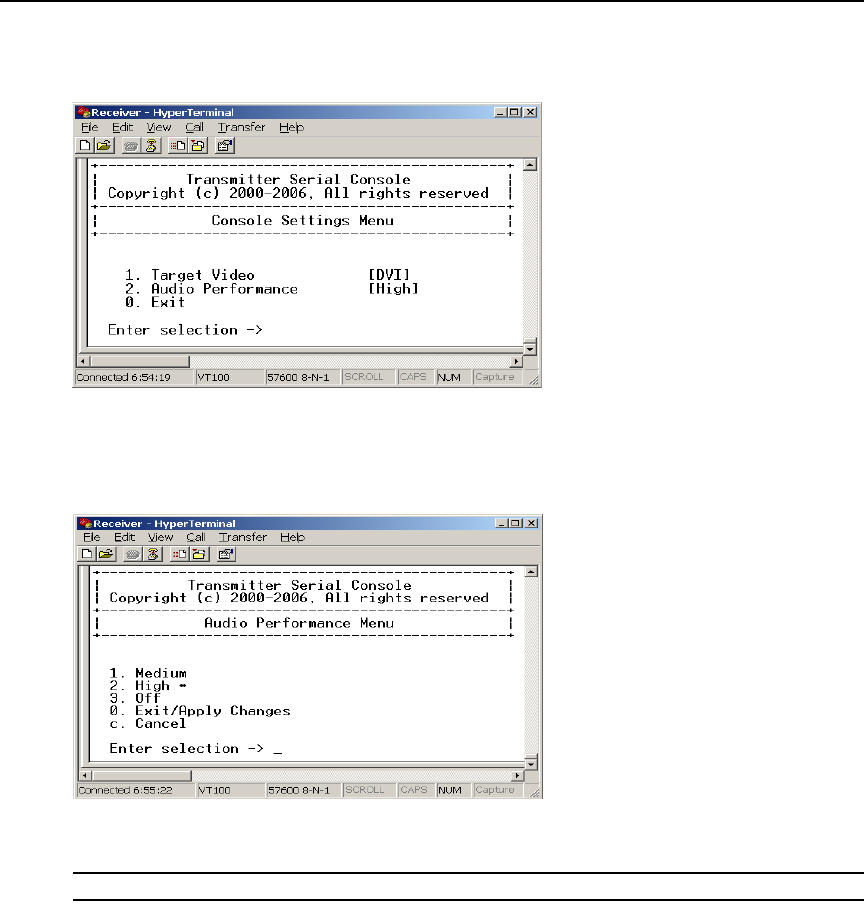
4. Choose Console Settings. The Console Settings Menu will appear. The current audio
performance setting is displayed beside menu item 2. Audio Performance.
Figure 3.28: Transmitter Console Settings Menu
5. Choose Audio Performance. The Audio Performance Menu will appear.This menu shows you
the audio settings that you can choose from. The current setting is indicated by an
asterisk symbol *
Figure 3.29: Transmitter Audio Performance Menu
6. Type the number that corresponds to the audio setting you wish to apply and press Enter.
NOTE: If you choose “off,” audio support will be disabled.
7. To confirm your selection and exit the screen, type 0 (zero) and press Enter. The unit resets
after you press
Enter.