SuperSerial™ ESP Multi-Interface Serial Hub Product Installation Guide PN 590-290-001A August 2002
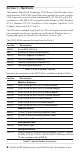
Section 1 - Hardware The Equinox SuperSerial Technology (ST) Ethernet Serial Provider 8-port Multi-Interface (ESP-8 MI) Serial Hub can be installed in a local or remote LAN to provide access for widely distributed RS-232, RS-422 or RS-485 serial devices. The ESP-8 MI is supported under Windows 2000, Windows NT 4.0, Windows NT 3.51, OpenServer 5.0.5a or higher, UnixWare 7.0.1a or higher, Linux and AIX 4.3 and 5.1.
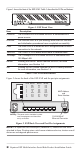
Figure 1 shows the front of the ESP-8 MI. Table 3 describes the LEDs and buttons. Figure 1.
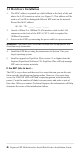
1.1 Hardware Installation 1. The MAC address is printed on a label afxed to the back of the unit above the LAN connector socket (see Figure 2). This address will be used as a Unit ID to distinguish different ESP units on the network. Record the MAC address. 00 - 80 - 7D - _____ - _____ - _____ 2. Attach a 10BaseT or 100BaseT LAN interface cable to the LAN connector on the back of the ESP. A CAT 5 cable is required for 100BaseT operation. 3.
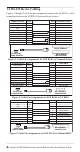
1.2 RS-232 Device Cabling Figures 3 through 5 show the pin assignments required for an RS-232 cable connection between the ESP RJ-45 ports and your devices. To ESP RJ-45 Port Clear to Send N/C N/C Signal Ground Transmit Data Receive Data Data Carrier Detect N/C DataTerminal Ready Request to Send Pin # 4 Pin # 10 To Terminal / Printer Request to Send 9 8 7 6 5 4 3 2 1 . 7 3 2 20 8 6 5 Signal Ground Receive Data Transmit Data Data Terminal Ready Data Carrier Detect Data Set Ready Clear to Send .....
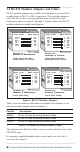
1.3 RS-232 Modular Adaptors and Cables RS-232 modular adaptors are available from Equinox to convert RJ-45 modular jacks to DB-25 or DB-9 connectors. These modular adaptors, used with the 10-wire reversing modular cables, perform the same functions as shown in Figures 3 through 5. Figure 6 shows the RS-232 modular adaptors available from Equinox.
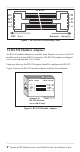
10-WIRE RTS 1 DTR 2 3 DCD 4 RD 5 TD 6 GND 7 8 9 CTS 10 ESP 10 9 8 7 6 5 4 3 2 1 Modular Port RTS DTR DCD RD TD GND CTS Adapter Figure 7. 10-Wire RJ-45 Reversing Cable 1.4 RS-530 Modular Adaptors An RS-530 modular adaptor is available from Equinox to convert an RJ-45 modualr jack to a male DB-25 connector. The RS-530 adaptor is designed to be used with standard CAT 5 cable. Each port that uses the RS-530 adaptor should be configured as RS-422.
1.4 INIT and RESET Buttons The INIT button can be used to remove configured information from an ESP unit. The ESP stores nonvolatile data such as SNMP community name, system contact and IP address in FLASH. This information can be erased by pressing the INIT button. NOTE: Pressing the INIT button will interrupt ESP operation and cause reinitialization to occur. The FLASH erase is performed in two phases.
Section 2 - Driver Installation This section contains instructions for installing the ESP driver from the Equinox SuperSerial CD-ROM. The ESP is supported under Windows 2000, Windows NT 4.0, Windows NT 3.51, OpenServer 5.0.5a or higher, UnixWare 7.0.1a or higher, Linux and AIX 4.3 and 5.1. 2.1 Windows 2000 To install the Windows 2000 ESP driver, you must first run SETUP.EXE from the Windows 2000 ESP driver diskette that is made using the Equinox SuperSerial CD-ROM. SETUP.
11. Once all les are copied, click Finish. Your ESP is now installed. Windows 2000 will now install the ESP serial ports. 2.2 Windows NT 4.0 1. Navigate to Settings - Control Panel - Network to display the Network Control Panel. Select the Services tab. Click Add to install the ESP driver for Windows NT 4.0. 2. The Control Panel will generate a list of standard Network Services. The Equinox ESP Service is a new network service. Click the Have Disk button. 3.
2.4 OpenServer The following sections contain procedures for installing the ESP driver on an Open Server release 5.0.5a or higher system. 2.4.1 Installing Directly from CD-ROM 1. Mount the CD-ROM volume using the following command: mount -f ISO9660,filemode=444 For example, the following command mounts a CD-ROM on drive 1 to /mnt: mount -f ISO9660,filemode=444 /dev/cd1 /mnt 2. Install the driver using the “custom” utility with media image VOL.000.000. 3.
2.4.3 Creating and Using OpenServer ESP Installation Diskettes on DOS 1. Load the Equinox SuperSerial Software CD into your CD-ROM drive. 2. Set your default drive to the CD-ROM drive letter. 3. Run the command MAKEUNIX and select the appropriate Equinox product and operating system for which diskettes are needed. 4. Once the OpenServer installation diskette is created, refer to the following le for detailed installation instructions: /drivers/esp/sco/readme.txt 2.4.
2.5 UnixWare The following sections contain procedures for installing the ESP driver on a UnixWare release 7.0.1a or higher system. 2.5.1 Creating and Using UnixWare ESP Installation Diskettes on UnixWare 1. Mount the CD-ROM volume using the following command: 2. Run the following commands: cd /mnt [or other mount point] mount -f cdfs -0 fperm =0555,nmconv=c -r/dev/cdrom/ c0b0t110/mnt ./makeunix.sh 3. Follow the on-screen instructions to build an installation diskette for UnixWare ESP. 4.
2.6 Linux The following sections contain procedures for installing the ESP driver on a Linux system. 2.6.1 Creating and Using Linux ESP Installation Diskettes on Linux 1. Mount the CD-ROM volume using the following command: mount -t iso9660 For example, the following command mounts the rst CD-ROM in a typical environment: mount -t iso9660/dev/cdrom /mnt/cdrom 2. Run the following commands: cd /mnt/cdrom [or other mount point] ./makeunix.sh 3.
2.7 AIX The following sections contain procedures for installing the ESP driver on an AIX release 4.3 or 5.1 system. 2.7.1 Installing Directly from CD-ROM (AIX 5.1 only) This procedure is valid only on AIX release 5.1 systems. 1. Mount the CD-ROM volume using the following command: mount -v cdrfs -o ro /dev/cd0/mnt 2. Change to the RPMS directory using the following command: cd /mnt/RPMS/AIX51 3. Install the RPM using the following command: rpm -ivh ./espx-3.06.aix.5.1.ppc.rpm 4.
2.7.4 Creating and Using AIX ESP Installation Diskettes on Microsoft Windows 1. 2. Load the Equinox SuperSerial Software CD. • If you have autoplay enabled, the Equinox SuperSerial Software Installation screen will appear. • If you do not have autoplay enabled, set your default drive to D: and run the command D:\SETUP, where D: is your CD-ROM drive letter. Click UNIX on the Main Window. 3. Select the UNIX operating system for which you need drivers.
Declaration of Conformity Manufacturer’s Name: Equinox Systems Inc. an Avocent Company Manufacturer’s Address: One Equinox Way Sunrise, Florida 33351-6709 USA declares, that the products Product Name: Ethernet Serial Provider Model Names: ESP-8 10/100, ESP-16 10/100, ESP-MI Product Options: Year of Manufacture: All 2002- conform to the following Product Specification: Safety: EMC: IEC No. 60950 2nd Ed., A1, A2, A3, A4 UL 1950 3rd Ed., CAN/CSA-C22.2 No.
© 2002 Equinox Systems Inc. All rights reserved. Reproduction without permission prohibited. Equinox, SuperSerial and Avocent are registered trademarks or trademarks of Avocent Corporation. All other brands and product names are trademarks of their respective holders. Equinox makes no representations or warranties with respect to the contents hereof and specifically disclaims any implied warranties of merchantability or fitness for any particular purpose.
Equinox Systems Inc. One Equinox Way Sunrise, Florida 33351-6709 (954) 746-9000 Fax: (954) 746-9101 ftp.equinox.com www.equinox.com support@equinox.