
Instruction manual

9
PN-Series Manual
2. Clean the weighing pan and press TARE to re-zero the balance.
3. When the balance is stabilized press and hold the CAL button for 5 seconds.
4. The display will show “-CAL-” then the required weight will ash on the display.
5. Place the calibration weight onto the center of the platform and wait for the display to stop ashing.
6. You may now remove the weight. The scale will return to normal weighing mode
3.6. Linear Calibration
Linear calibration adjusts the balance at two or more points, rather than just one. To enter linear calibration,
follow these steps:
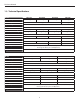
1. Prepare the calibration weights (See Section 1.3 for required weight).
2. Clean the weighing pan and press TARE to re-zero the balance.
3. When the balance is stabilized, press and hold the CAL button for 5 seconds.
4. The display will show “-CAL-”, then the standard calibration weight will ash on the display.
5. At this point, press and hold the MODE button for 5 seconds.
6. The display will ash the rst required calibration weight for linear calibration. Place the required weight
onto the center of the platform.
7. Once the weight is accepted, the display will ash the next required calibration weight. Place the required
weight onto the center of the platform. The weights value will be displayed when it is accepted.
8. When the last required calibration weight is removed, the display will return to zero to indicate that
calibration is complete.