
User's Manual




ATTACHING THE SIDE HANDLE
EXTENSION ARM
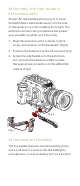
Attach the side handle extension arm to move
the URSA Mini’s side handle away from the side
of the camera to a comfortable arm’s length. The
extension arm also lets you balance and steady
your shoulder rig while you’re shooting.
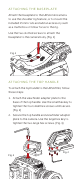
1. Align the extension arm’s rosette, rosette
screw, and receiver on the baseplate. (Fig.6)
2. Screw in the extension arm until secure. (Fig.6)
3. Screw the side handle onto the extension
arm, and use the extension cable to make
the appropriate connection to the URSA Mini
camera. (Fig.7)
ATTACHING ACCESSORIES
The top handle features 1/4-20 mounting points
and a cold shoe for accessories like LED lights,
microphones, or an articulating arm for a monitor.
Fig. 6
Fig. 7