
Technical data

TFCB24F3XYZ1
Specification & Installation Instructions
10
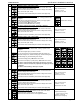
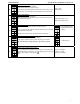
BACnet Program Mode (available when in Operation Mode; JP1 set to RUN)
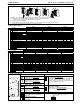
Push on both
and buttons for 5 seconds to access the BACnet Program Mode.
Step Display Description Values
B1
Password:
Display scrolls “ENTER PASSWRD” and 000.
You have 1 minute to enter the password using the arrow buttons
and
increase or decrease the value, one digit at a time. Press to
move to the next digit and press
to move one digit to the left.
.
When the password is correct press on
. If you make a mistake, the
screen displays “Eror” and the thermostat returns to normal operation
mode. You will need to repeat this step.
Password: 637
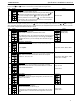
Once the password is entered and you are in the BACnet program mode, the symbol is displayed. Press on the button to
advance to the next program function, press on the
button to return to previous step and press on the or button to change
value. The system will exit the menus and return to normal function if you navigate through the entire menu or if no button is pressed
for 5 minutes, changed values will automatically be saved.
Step Display Description Values
B2
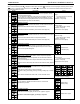
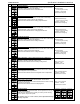
Auto bauds rate:
Display scrolls “auto BAUDS RATE”.
You can enable or disable the Auto Bauds Rate function.
If you enable this function, the controller automatically configures its baud
rate by detecting the network speed upon connection (go to Step B3). If
you disable this function, you must manually select the baud rate (go to
Step B4).
Default value:
Enable (YES)
B3
Auto bauds, current baud:
Display scrolls “auto comport BAUDS RATE. and the detected baud rate.
Go to step #B5.
Range: 9600, 19200, 38400, 76800
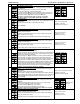
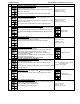
B4
Communication bauds rate:
Display scrolls “ADJUST COMPORT BAUDS RATE” and the value of the baud rate
in kBps. Select the desired communication bauds from the options
provided: 9.6, 19.2, 38.4, 76.8.
Range: 9600, 19200, 38400, 76800
Default value: 76.8 kBps
B5
MAC address:
Display scrolls “ADJUST MSTP mac address” and the value of the MAC
address. Each device must have a unique MAC address on a network.
Set the desired MAC address.
Range: 0 to 254
Default value: 0
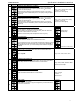
B6
Copy config:
Display shows “copy config”.
Select “YES” if you want to copy the configuration you did to this device
to others on the network.
B7
Select “start” address:
Display shows “Select begin address”.
Select the first address you want to copy to.
For example if you select MAC address 1 here and 54 in the next step,
all the devices from 1 to 54 will receive the configuration of the current
device.
Range: 0-254
Default value: 0