
Technical data


TFCB24F3XYZ1
Specification & Installation Instructions
12
Annex
–
Error Codes for Copy Config
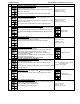
CC1
Succeed:
If there are problems with the copy, user will be able to scroll through the range of addresses to find out the error
codes for each address.
In the event that some worked, they will be labelled as “
succeed” with the address shown underneath.
CC2
Program mode error:
Display shows “
progerr” with the address shown underneath.
The target device is in program mode, the copy is not possible.
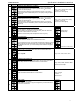
CC3
Device type error:
Display shows “
typeerr” with the address shown underneath.
The target device is not the same type as the source, the copy is not possible.
For example trying to copy an EVC configuration to an EFC.
CC4
Model type error:
Display shows “
modlerr” with the address shown underneath.
The target device is not the same model as the source, the copy is not possible.
For example trying to copy an EVCB74WIT2S configuration to an EVCB74WIT4S.
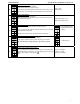
CC5
Memory error:
Display shows “
mem err” with the address shown underneath.
The target device is not the same application version (eeprom) as the source, the copy is not possible.
CC6
Slave address:
Display shows “
Slave” with the address shown underneath.
The target device is at a slave address. It cannot respond to the master if the copy went ok or not.
User should manually check to make sure copy was done correctly or avoid using slave addresses (128-254).
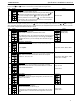
CC7
Communication error:
Display shows “copy config commerr” with the address shown underneath.
No responses were received from the target device (after 3 tries).
Either the address doesn’t exist (not used) or there is a problem with wiring/noise.