
Technical data


TFCB24F3XYZ1
Specification & Installation Instructions
13
Operation Mode
Step Description Display
A
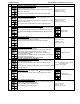
At powering up, thermostat will light display and activate all LCD segments during 2 seconds.
Illuminating the LCD.
To illuminate the LCD, you just have to push onto any of the 4 buttons. LCD will light for 4 seconds.
Temperature display
In operation mode, thermostat will automatically display temperature read.
If “OFF”, “- - -” and alarm symbol are displayed, the temperature sensor is not connected or short
circuited.
To change the scale between ºC and ºF, press on both
and for 3 seconds.
C
B
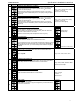
Temperature set point display and adjustment
To display the set point, press two times on
or . Set point will be displayed during 3 seconds.
To adjust set point, press on
or while the temperature set point is displayed.
Note: If set point adjustment has been locked,
symbol will be displayed.
C C
C
No occupancy mode :
When thermostat is in no occupancy mode, moon symbol
is displayed, so set point for cooling
and/or heating are increased as per the setting made in programming mode.
If not locked, no occupancy mode can be derogated for a predetermined period by pressing onto
any of the 3 buttons. During period of derogation the
symbol will flash. If does not flash, the
derogation period is finished or the no occupancy mode derogation has been locked in
programming mode.
C
D
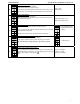
Control mode selection :
To change the control mode, press on
. Control mode will be displayed during 5 seconds. You
can choose one of the following:
Automatic Cooling or Heating
Cooling and Heating OFF
Cooling only
Heating only
Note: These selections can vary according to the choice made on steps #6 & #7.
E
Fan speed mode selection:
To change the fan speed mode, press on
. Fan speed mode will be displayed during 5 seconds.
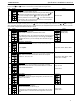
You can choose one of the following:
Automatic speed (if not disable in programming mode)
Low speed
Medium speed
High speed
Note: These selections can vary according to the choice made on step #33 & #36.