
Technical data

TFCB24F3XYZ1
Specification & Installation Instructions
9
50
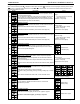
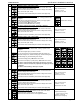
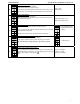
Select “start” address:
Display shows
“Select begin address”.
Select the first address you want to copy to.
For example if you select address 1 here and 54 in the next step, all the
devices from 1 to 54 will receive the configuration of the current device.
Range: 0-254
Default value: 0
51
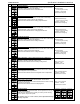
Select “end” address:
Display shows
“Select end address”.
Select the last address you want to copy to. You cannot copy on more
than 63 addresses at once.
Range: begin address + 63
Default value: begin address
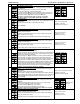
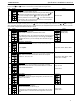
52
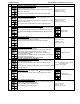
Copy config result:
Display shows “
Copy config succeed” if everything went ok.
If not, you will be able to scroll the addresses and see the error message
associated with each address.
See the Annex section for the complete list of error messages.
Error message example:
Program Mode Error for
address 7
53
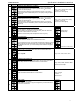
Communication device instance:
Display shows
“adjust device instanc 0153000”.
If you want to change the device, select
“yes” and go to next step.
If you do not want to change the device, go directly to step #1.
Default value: no
54
Communication device instance (cont’d):
Display shows the device address value.
You can modify the device address by incrementing or decrementing the
blinking digit with
or buttons. To modify following digit on right press
, to return to digit on the left press .
Range: 0 to 4194302
Increment: 1 by digit
Default value: 0153000