
Installation guide
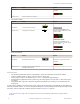
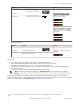
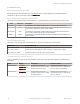

Method Action Result
SET Button
• Present sensing condition
•
Click the SET rocker button
Threshold Condition Accepted
Displays read "wInd SEt" then
alternate "PASS" with % Offset
10
;
Sensor returns to Adjust mode
Threshold Condition Not Accepted
Displays read "wInd SEt" then
alternate "FAIL" with minimum %
Offset
10
for sensing condition; Sensor
returns to Adjust mode
Remote Input
• Present sensing condition
•
Single-pulse the remote input
T
3. Return to RUN Mode
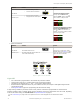
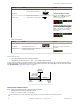
Method Action Result
SET Button Move Mode switch to Run
Display: Red - Signal Level; Green -
Window Center (see Figure 5 on page
12
for instructions on how to display
upper and lower thresholds)
Remote Input No action required; sensor returns to
Run mode automatically
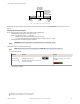
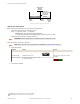
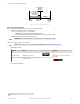
Figure 5. Upper and Lower Thresholds
Light SET
•
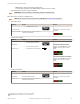
Sets a threshold a programmable % offset below the presented condition
• Changes output state on any condition darker than the threshold condition
• Threshold can be adjusted using "+" and "-" rocker button (Manual Adjust)
• Recommended for applications where only one condition is known, for example a stable light background with
varying darker targets
• See Program Mode on page 6 for programming the Offset Percent setting
A single sensing condition is presented, and the sensor positions a threshold a programmable % offset below the
presented condition. When a condition darker than the threshold is sensed, the output either turns ON or OFF, depending
on the LO/DO switch setting (see LO/DO Switch in Top Panel Interface on page 4).
10
See Troubleshooting on page
18 for more explanation of the % Offset displayed after the Window SET method
DF-G1 Expert
™
Dual Display Fiber Amplifier
12 www.bannerengineering.com - tel: 763-544-3164 P/N 161275 Rev. C