
Instruction manual


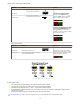


• Severe contamination/changes in the taught condition can prevent the Auto Thresholds algorithm from optimizing
the threshold(s). If this occurs, the
DF-G1 will enter a Threshold Alert or Threshold Error state. See
Troubleshooting on page 24 for more explanation.
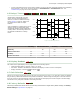
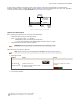
4.5 Delays/Timers
ON/OFF Delays and ON/OFF One-Shot
timers can be programmed between 1 -
9999 ms (a value of 0 disables the delay/
timer). Figure 3 on page
11 defines how
the delays/timers affect the output
behavior.
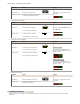
Some combinations of delays/timers are not
allowed. The DF-G1 programming menu
automatically disables invalid combinations
of delays/timers. The following table shows
the allowable combinations of delays/
timers:
Output
OFF Delay
ON Delay
Time
OFF 1-Shot
ON 1-Shot
ON
OFF
D
D
D
D
D
D
D
D
(D = 1 - 9999 ms)
Figure 3. DF-G1 Delays/Timers
OFF Delay OFF One-Shot Timer ON Delay ON One-Shot Timer
OFF Delay - OK OK N/A
OFF One-Shot Timer OK - N/A N/A
ON Delay OK N/A - OK
ON One-Shot Timer N/A N/A OK -
4.6 Display Readout
The readout of the digital displays can be programmed for the following options:
•
Signal/Threshold readout - Numeric (1234) or % (123P)
• ECO mode - Enabled or Disabled (ECO mode dims the displays to reduce current consumption)
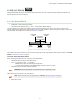
• Display Orientation - Normal (
) or Flipped ( )
4.7 Gain Selection
The DF-G1 can operate in Auto Gain mode or the Gain can be fixed to be in Gain 1…8. In Auto Gain, the DF-G1 optimizes
the gain during a TEACH/SET method for the presented condition(s). While viewing the fixed gains in the Gain Selection
choice list, the
DF-G1 will automatically switch to the selected gain and display the measured signal on the Red display.
This allows for easy and quick evaluation of the fixed gain mode.
4.8 Factory Defaults
The Factory Defaults menu allows the DF-G1 to be easily restored back to original factory default settings (see Factory
Default Settings in Specifications on page
26).
DF-G1 Expert
™
Dual Display Fiber Amplifier
11