
Instruction manual


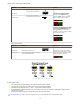


6.2 Dynamic TEACH
• Teaches on-the-fly
•
Establishes a single switching threshold
• Threshold can be adjusted using "+" and "-" rocker button (Manual Adjust)
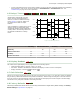
Dynamic TEACH is best used when a machine or process may not be stopped for teaching. The sensor learns during actual
sensing conditions, taking multiple samples of the light and dark conditions and automatically setting the threshold at the
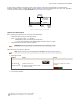
optimum level (see Figure 6 on page 15).
Sensor positions
threshold midway
between taught conditions
Darkest
(no signal)
Most Light
(saturated
signal)
Output OFF Output ON
Darkest Taught
Condition
Lightest Taught
Condition
Position
adjusted by
Manual
Adjust
Figure 6. Dynamic TEACH (Light Operate shown)
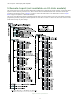
The output ON and OFF conditions can be reversed using the LO/DO switch (see LO/DO Switch in Top Panel Interface on
page
4).
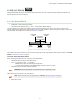
Dynamic TEACH and Manual Adjust
Moves switching threshold value up or down to make adjustments
• Slide Mode switch to ADJ to enter Adjust mode
• Press "+" to increase; press "-" to decrease
◦ GREEN display shows the switching threshold value
◦ 2 seconds after adjustment, GREEN display will flash 3 times to confirm
• Slide Mode switch to RUN to complete operation
Remember: Manual adjustments are disabled when Auto Thresholds are ON
Follow these steps to perform a Dynamic TEACH:
NOTE: TEACH Selection must be programmed to dYn tcH (see Program Mode on page
9 )
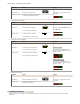
1. Enter Adjust Mode.
Method Action Result
SET Button
5
Set Mode switch to ADJ Display: Red - Signal Level; Green -
Threshold
Remote Input
6
No action required; sensor is ready for
Dynamic TEACH method
2. Enter Dynamic TEACH.
5
SET Button: 0.04 seconds ≤ "Click" ≤ 0.8 seconds
6
Remote Input: 0.04 seconds ≤ T ≤ 0.8 seconds
DF-G1 Expert
™
Dual Display Fiber Amplifier
15