
Instruction manual
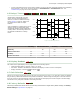


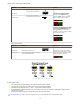


Method Action Result
SET Button Click the SET rocker button
Display: Flashes "dYn tch" then holds
on "1234 dYn"
Remote Input Single-pulse remote input
T
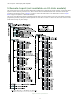
3. Present ON and OFF Conditions.
Method Action Result
SET Button Present ON and OFF conditions Display: Red - Signal Level; Green -
Threshold
Remote Input Present ON and OFF conditions
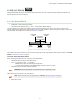
4. Exit Dynamic TEACH.
Method Action Result
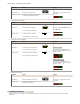
SET Button Click the SET rocker button TEACH Accepted
Displays alternate "PASS" with %
Minimum Difference
7
, Sensor returns
to Adjust mode
TEACH Not Accepted
Displays alternate "FAIL" with %
Minimum Difference
7
, Sensor returns
to Adjust mode
Remote Input Single-pulse remote input
T
5. Return to RUN Mode.
Method Action Result
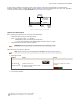
SET Button Move Mode switch to RUN Display: Red - Signal Level; Green -
Threshold
Remote Input No action required; sensor returns to
RUN mode automatically
7
See Troubleshooting on page
24 for more explanation of the % Minimum Difference displayed after the Dynamic TEACH
method.
DF-G1 Expert
™
Dual Display Fiber Amplifier
16