
User guide

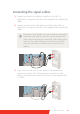


Table Of Contents
- Welcome!
- Table of contents
- What's in the box
- Parts, controls and connectors
- Display installation
- Daily operation
- Advanced operation
- OSD menu position
- OSD menu language
- OSD menu automatic close function
- Power status indicator light
- Key indicator lights
- Power lock function
- Keys sound
- Ethernet over USB
- DDC HID Device
- DPMS mode
- Hibernate
- Luminance target
- Color presets
- Color temperature
- Color coordinates
- Viewing modes
- Display functions
- Ambient Light Compensation (ALC)
- Reading rooms
- Continuous ALC
- Image scaling
- Image source selection modes
- Video input signals
- Video encoding modes
- Grayscale conversion modes
- EDID timings
- Display info
- Display status
- Cleaning your display
- Repackaging instructions
- Important information
16 Coronis Fusion 6MP
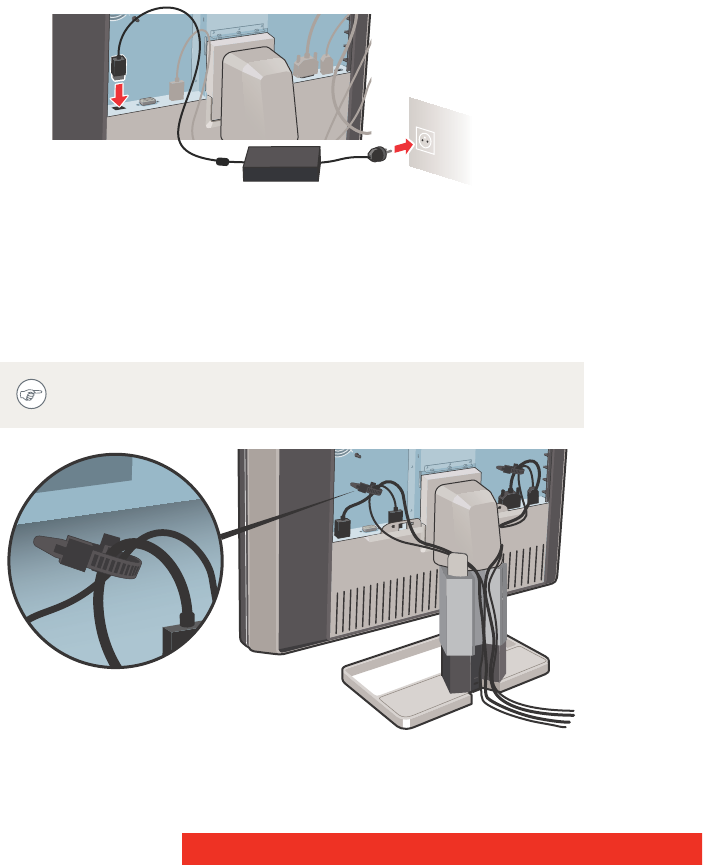
Connecting the power cables
1 Connect the supplied external DC power supply to the +24 VDC
power input of your C
ORONIS FUSION 6MP display.
2 Plug the other end of the external DC power supply into a
grounded power outlet by means of the proper power cord
delivered in the packaging.
Routing the cables
Route all connected cables through the cable routing channel in the
stand of your display.
The cable straps at the inside of the connector compartment
allow you to fix the cables for better shielding of the cables.