
User guide

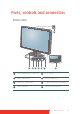
Table Of Contents
- Welcome!
- Table of contents
- What's in the box
- Parts, controls and connectors
- Display installation
- Daily operation
- Advanced operation
- OSD menu position
- OSD menu language
- OSD menu automatic close function
- Power status indicator light
- Key indicator lights
- Power lock function
- Keys sound
- Ethernet over USB
- DDC HID Device
- DPMS mode
- Hibernate
- Luminance target
- Color presets
- Color temperature
- Color coordinates
- Viewing modes
- Display functions
- Ambient Light Compensation (ALC)
- Reading rooms
- Continuous ALC
- Image scaling
- Image source selection modes
- Video input signals
- Video encoding modes
- Grayscale conversion modes
- EDID timings
- Display info
- Display status
- Cleaning your display
- Repackaging instructions
- Important information

8 Coronis Fusion 6MP
What's in the box
Your CORONIS FUSION 6MP display comes with:
• this C
ORONIS FUSION 6MP display guide
• a system CD
• two DVI cables
• two DisplayPort cables
• a USB cable
• a set of AC power cords
• an external power supply
If you ordered a Barco display controller, it’s also in the box together
with its accessories. A dedicated user guide is available on the system
CD.
Keep your original packaging. It is designed for this display and
is the ideal protection during transport.