
Instruction manual
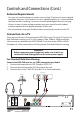
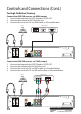
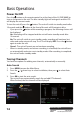

13
After Sales Support
Telephone: 1300 886 649
Email: info@tempoaustralia.com.au
Controls and Conections (Cont.)
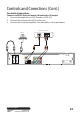
For Audio Connection:
Connect via SPDIF (Optical/Coaxial), Mixed Audio L/R output
1. Connect the loop cable to LOOP IN and to LOOP OUT.
2. Connect the antenna with ANT IN of the unit.
3. Connect the unit to the amplier via audio cable, as illustrated below.
100-240V~
50/60Hz
TUNER-S
ANTO UT
LOOP IN
TUNER-M
LOOP OUT
ANTI N
SPDIF HDMIUSB YP bP r
L
R
CVBS
CAUTION: TO REDUCE THE RISK OF ELECTRIC SHOCK.
DO NOT REMOVE COVER. NO USER, SERVICEABLE PARTS INSIDE.
REFER SERVICING TO QUALIFIED SERVICE PERSONNEL.
CAUTION
RISK OF ELECTRIC SHOCK
DO NOT OPE N
Antenna
Audio Decoder Interface
DIGITAL INPUT
OPTICALL R
AUDIO INPUT