
Instruction manual

15
After Sales Support
Telephone: 1300 886 649
Email: info@tempoaustralia.com.au
Basic Operations (Cont.)
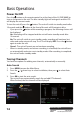
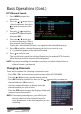
DTV Manual Search
1. Press MENU to open the
Main Menu.
2. Press the / arrow keys to
select Installation, then press
to enter the menu on the
right.
3. Press the / arrow keys
to select DTV Manual Search,
then press OK.
4. Press the / arrow keys
to select a frequency. After a
few moments the Strength &
Quality bars will indicate if there is any signal on the selected frequency.
5. Press OK to add the selected frequency to the list you wish to scan.
A ‘+’ symbol will appear in the column Selected.
6. Press to start the scan.
The unit will now search the selected frequencies for and add DTV channels.
When nished, the rst channel will be displayed.
NOTE: Any timer recordings or reminders you have set will be cleared when a
channel search is performed.
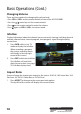
Changing Channels
There are ve options for selecting a channel to view:
• Press CH+ / CH- on the remote control or front of the AS-PVR1000R.
• Press the / arrow keys on the remote control.
• Press OK to display channel list, then use the / arrow keys to choose a
channel and press OK to view it.
• Use the numbered buttons to directly enter the
channel number you wish to view.
• Press the EPG button to open the Program Guide and
select a channel from the list.
NOTE: If recording two programs, you will only be
able to select and view channels from the
same broadcaster as the two programs you are
recording.