
Instruction manual

17
After Sales Support
Telephone: 1300 886 649
Email: info@tempoaustralia.com.au
Subtitles (Closed Captions)
This service allows you to activate subtitles while watching normal television
programs that provide it.
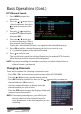
1. Press SUB while in Live TV
mode to display the Subtitle
selection window.
2. Press the / arrow keys on
the remote control to select a
subtitle language.
3. Press OK to turn on the
selected subtitle language.
To disable subtitles, select
‘Subtitle O’.
NOTE: Not all channels or
programs broadcast subtitles.
Basic Operations (Cont.)
Format
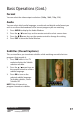
You can select the video output resolution (1080p, 1080i, 720p, 576i).
Audio
You can select which audio language, sound track and digital audio format you
wish to use from the broadcast of the current program you are watching.
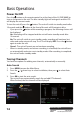
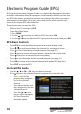
1. Press AUDIO to display the Audio Window.
2. Press the / arrow keys on the remote control to select a menu item.
3. Press the / arrow keys on the remote control to change the setting.
4. Press EXIT to close the Audio Window.