
Instruction manual



23
After Sales Support
Telephone: 1300 886 649
Email: info@tempoaustralia.com.au
Media Browser/File Manager
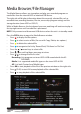
The Media Browser allows you to explore and play your recorded programs or
media les from the internal HDD or attached USB device.
The right side will display information about the currently selected le such as
recorded time, recording duration, le size, censorship (program rating) and the
storage location (inner HDD or USB1/2).
While in Media Browser, the last channel you were watching will continue to play in
the top right corner until a media le is previewed.
NOTE: Only connect and disconnect USB devices when the unit is in standby mode.
Press the PVR button to open the Media Browser window.
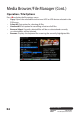
• Press to display the le options.
• Press to select a series of les (for use with Copy, Delete, etc. options).
• Press to delete the selected le.
• Press to reorganise the list by ‘Record Date’, ‘File Name’ or ‘File Size’.
• Press the / arrow keys to select a le.
• Press / to scroll up/down, one page at a time.
• Press / to change the le list view.
Recording: Lists programs on inner HDD & USB recorded with the AS-
PVR1000R.
Media: Lists supported media le types on the inner HDD & USB.
All: Lists both ‘Content’ and ‘Media’ types.
• Press OK to start playback of the le in the preview window on the right side.
• Press (PLAY) to start full screen playback of the selected le.
• Press to stop playback of the selected le.