
Instruction manual



28
After Sales Support
Telephone: 1300 886 649
Email: info@tempoaustralia.com.au
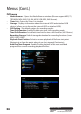
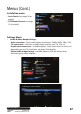
Menus (Cont.)
• Time
Mode - Auto.
Display Existing Date - Automatically set from broadcast signal.
Display Existing Time - Automatically set from broadcast signal.
Daylight Saving Time - Enable/Disable summer time (+1hr).
Region - Select your time zone.
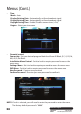
• Parental control
Censorship - Set your desired program block level from All Block, P, C, G, PG, M,
MA, AV, R, No Block.
Installation Menu Control - Set it to Lock to require password to access the
menu area.
Settings Menu - Set it to Lock to require password to access the menu area.
PVR Menu - Set it to Lock to require password to access the menu area.
New Password - Create a new password
Conrm Password - Re-enter your new password to conrm it.
NOTE: If Lock is selected, you will need to enter the password to enter the menu.
The factory default password is "0000".