
Instruction manual



29
After Sales Support
Telephone: 1300 886 649
Email: info@tempoaustralia.com.au
Menus (Cont.)
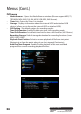
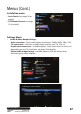
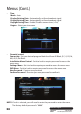
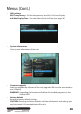
• OSD settings
OSD Transparency - Set the transparency level for On-Screen Display.
Info Box Display Time - Set auto hide time for Info box (see page 16).
• System information
View system information of the unit.
• Firmware upgrade
Select to upgrade the software of the unit (upgrade USB must be connected to
rear USB port).
WARNING: Upgrading the rmware will delete all recorded programs on the
internal HDD.
• Factory default
Restore to factory default settings.
CAUTION: Restoring to factory defaults will clear all channels and settings you
may have made. All recorded data will be lost.