
Owner`s manual



Operation
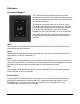
Using the Thermostat Keypad
The Thermostat Keypad shows the current temperature, set point and modes, and allows you
to manually control your furnace and air conditioner.
Using the Web
The real power of the BAYweb Thermostat is realized by using the web site to access your
thermostat. The web site can be accessed anytime from anywhere via web browser and
Internet enabled mobile phone. Unlimited use of the web site is included at no charge.
To setup your web site account go to the web site (www.bayweb.com), register a new
account, login and add a device (your thermostat). You will need the serial number and key
code that are located on the control module.
12
Indicators show
Indicators show
which modes are
which modes are
selected
selected
Press once to show
Press once to show
the current set point.
the current set point.
Press again to
Press again to
change.
change.
Press to select
Press to select
HEAT mode. If
HEAT mode. If
selected, press
selected, press
again to turn OFF.
again to turn OFF.
Press to change
Press to change
HOLD mode. If
HOLD mode. If
selected the
selected the
current set point
current set point
will be used
will be used
regardless of
regardless of
schedule.
schedule.
Current
Current
Temperature
Temperature
Press to select
Press to select
COOL mode. If
COOL mode. If
selected, press
selected, press
again to turn OFF.
again to turn OFF.
Press to change
Press to change
the FAN mode
the FAN mode
between AUTO
between AUTO
and ON.
and ON.