
Owner`s manual
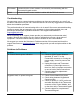



Thermostat Indicates that the control module is successfully communicating with the
Thermostat Keypad module.
Uplink Indicates that the control module is online with the BAYweb servers.
Troubleshooting
We encourage you to communicate any problems you have encountered to us, even if you
are able to solve them on your own. We would also like to have any suggestions or comments
about the installation procedure.
The preferred method of communicating with us is via email. We use an automated tracking
system to ensure that we respond to your messages in the quickest possible time, and
provide the shortest path to problem resolution. Our support email address is
support@bayweb.com.
When contacting us for support, please provide your name and your thermostat serial
number. We may also request your key code to validate that you own a given piece of
equipment. The serial number and key code are located on the Control Module.
We suggest you review the Solutions to Problems section of this manual and check the
support resources on www.bayweb.com which may provide you with a simple solution to the
problem.
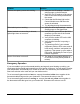
Solutions to Problems
Problem Solution
No Control Module power indication.
✔ Check for 24VAC power between
terminals “R” and “C” on the
Furnace/AC connector, or if using the
power supply, check for power at the
outlet.
✔ Unplug Alert input and Thermostat
connectors, if power light comes on
there is a short or improper connection
on one or both of these connections.
✔ Contact support for replacement
Control Module.
Keypad is dark, no power at keypad.
✔ Check Control Module has power.
✔ Check wiring between Keypad and
Control module.
✔ Check for power (3.3 VDC) on the red
and white terminals of the Thermostat
connector of the Control Module, and
on the wires at the Thermostat Keypad.
✔ Contact support for a replacement
Thermostat Keypad.
19