
User guide

Page 4-4
User Guide
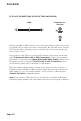
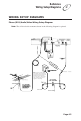
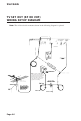
TV SET OUT (RF OF VHF)
The receiver sends non-stereo output through this connector. If you
connect the cable or broadcast TV antenna to the receiver, you must
use this to connect the TV. If you use this connection, you do not
need to use the Phono (RCA) or S-VIDEO connectors. However,
we recommend that you use them to support the highest quality
stereo sound and video.
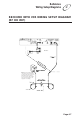
PHONO (RCA) VIDEO OUTPUT (COMPOSITE)
The receiver sends composite video signals through the yellow
phono (RCA) video jack to other video equipment, such as a video
monitor or TV. The video equipment must be equipped with a
phono (RCA) video input.
PHONO (RCA) AUDIO OUTPUTS
The receiver sends stereo audio out through the red and white audio
jacks to other audio equipment, such as a TV, VCR, or stereo
amplifier. If used, the audio equipment must be equipped with
phono (RCA) audio inputs.
SUPER VHS VIDEO (S-VIDEO) OUTPUT (BEST PICTURE)
The receiver supports S-VIDEO, which supports the highest
quality video available. If you use this back panel connection for
video, you must still connect the audio using the Phono (RCA)
Audio Outputs.
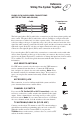
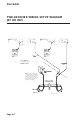
TELEPHONE JACK
Connect a telephone line with a standard RJ-11 telephone connector
to the receiver here, and then connect the line to an active telephone
connection.
Note: The receiver must be connected at all times to an active
telephone connection. If you install two or more receivers, each
receiver must be connected at all times to an active telephone
connection.
SATELLITE IN
Connect the coaxial cable from the satellite dish to the receiver
using this connection.
DOLBY
®
DIGITAL JACK
This is an optical jack for digital audio output that can be connected
to amplifiers/decoders with a similar input. Please consult the
section titled Using Digital Audio Output of this manual for
information on the proper configuration of this port, as an incorrect
configuration may damage your equipment.
Dolby
®
Digital