
User's Manual




-12-
BCL-862S User’s Manual (preliminary)
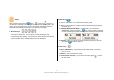
● If an incoming number is the same as the
one stored in a shortcut key and a nickname
is stored in it as well, the nickname instead
of the phone number is displayed as shown
in the image.
● If a caller has restricted Caller ID display
or has not applied for Caller ID service,
‘Caller ID Restricted!’ instead of the phone
number is displayed as shown in the image.
SMS Message
Receiving a Message
Up to 30 messages are stored. If the phone receives a new message when
30 messages are stored, it deletes a confirmed one from the oldest.
1. Wait mode
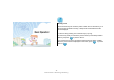
If the phone receives a message in Wait mode, a popup window is displayed
with a bell sound or vibration to notify you that a new message has been
received. The screen continues to be displayed as shown in the image until
any key is pressed. At this time, if Auto Keylock is set, it returns to that state
in 10 seconds automatically.
● If any key is pressed on the screen above, it returns to Wait mode and an
icon is displayed to notify you of the unchecked message.
2. During a Call