
User's Manual






-7-
BCL-862S User’s Manual (preliminary)
Keys
Keys consist of five Shortcuts, Menu, Power, and Side one. If
any of them is pressed, Auto Backlight turns on (Set the lighting time in the
menu). If you do not press any key for 10 seconds, the screen returns to
wait mode automatically (except you are checking a message).
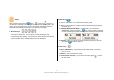
1. Shortcut Keys
● Function of Send Key : You can place a call by pressing it long.
● Confirming a Key Setting : If you press one of the shortcut keys shortly,
a phone number and a nickname stored in it are displayed.
3. Menu Key
● Use it to enter Menu. You cannot enter it during a call.
● While you are in Menu, it is used to select a desired menu (It functions
as an OK key.).
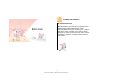
● Changing Bell/Vibration Mode : In Wait mode, you can select a
Bell/Vibration mode by pressing long. If one of them is selected,
a screen indicating that mode is displayed for a while as shown below.
● Send Key : After you confirm a phone number by pressing a shortcut
key, press to place a call to it.
4. Power Key
● Power ON/OFF Key : If you press it long in Wait mode, your phone
turns on or off.
● End Key : Use it to disconnect a call.
● Auto Keylock Clear Key : If your phone is locked, press to clear
the lock mode.