
User's Manual





-9-
BCL-862S User’s Manual (preliminary)
Initial Screen
Initial Screen
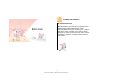
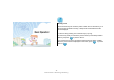
The initial screen displayed soon after the power turns on is as shown below,
and it includes several items, such as time and date.
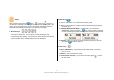
● The upper screen shows time (12:00), date (Monday, January 1
st
), receive
sensitivity, battery level, bell mode, and Auto Keylock mode.
● If you are in non-service area, all the bars in the icon for receive sensitivity
disappears, and then No Service icon appears.
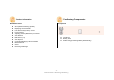
If a screen is displayed as shown below, your phone is not in service.
Register first to use it.
In that situation, menu related functions are operated normally, but Auto
Keylock is not. The icon for Auto Keylock appears on the screen but it is not
operated.