
Datasheet


ST72334J/N, ST72314J/N, ST72124J
35/153
11 POWER SAVING MODES
11.1 INTRODUCTION
To give a large measure of flexibility to the applica-
tion in terms of power consumption, four main
power saving modes are implemented in the ST7
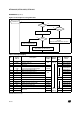
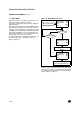
(see Figure 19): SLOW, WAIT (SLOW WAIT), AC-
TIVE HALT and HALT.
After a RESET the normal operating mode is se-
lected by default (RUN mode). This mode drives
the device (CPU and embedded peripherals) by
means of a master clock which is based on the
main oscillator frequency divided by 2 (f
CPU
).
From RUN mode, the different power saving
modes may be selected by setting the relevant
register bits or by calling the specific ST7 software
instruction whose action depends on the oscillator
status.
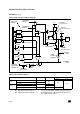
Figure 19. Power Saving Mode Transitions
11.2 SLOW MODE
This mode has two targets:
– To reduce power consumption by decreasing the
internal clock in the device,
– To adapt the internal clock frequency (f
CPU
) to
the available supply voltage.
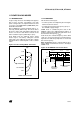
SLOW mode is controlled by three bits in the
MISCR1 register: the SMS bit which enables or
disables Slow mode and two CPx bits which select
the internal slow frequency (f
CPU
).
In this mode, the oscillator frequency can be divid-
ed by 4, 8, 16 or 32 instead of 2 in normal operat-
ing mode. The CPU and peripherals are clocked at
this lower frequency.
Note: SLOW-WAIT mode is activated when enter-
ing the WAIT mode while the device is already in
SLOW mode.
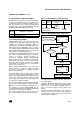
Figure 20. SLOW Mode Clock Transitions
POWER CONSUMPTION
WAIT
SLOW
RUN
ACTIVE HALT
High
Low
SLOW WAIT
HALT
00 01
SMS
CP1:0
f
CPU
NEW SLOW
NORMAL RUN MODE
MISCR1
FREQUENCY
REQUEST
REQUEST
f
OSC
/2
f
OSC
/4 f
OSC
/8 f
OSC
/2