
User's Manual Part 1


38 Using Your Phone
Phone Book
Adding Contacts to the Phone Book
The Phone Book will have different formats and data headings
depending on whether you have chosen to use a phone book stored on
your SIM card or in your phone's memory.
8 The phone book in your phone's memory can store up to 500
contacts. The capacity of a phone book on your SIM card depends on
the particular service provided by your network vendor.
SIM card Phone Book
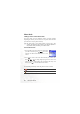
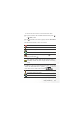
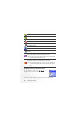
The data fields provided by a SIM card phone book are as follows:
The contact's name.
The contact's mobile phone number.
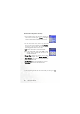
1. In the standby screen, enter the phone number that
you wish to store, then press (
Save). The screen
will show the Phone Book data fields for a new
contact.
2. Press to scroll to the contact data field that you wish to edit.
Press (
Edit), or simply begin keying in data to enter and
edit the currently selected field. After completing data entry and
settings, press to store the data for this contact.