
User's Manual

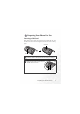
Table Of Contents
- Preparing Your Phone For Use
- Getting to Know Your Phone
- Using Your Phone
- Making a Phone Call
- Ending a Phone Call
- Answering a Phone Call
- Rejecting an Incoming Call
- Turning Off the Ring Tone for an Incoming Call
- Making an International Call
- Making an Emergency Call
- Dialing an Extension Number
- Speed Dialing
- Voice Dialing
- Listening to Voicemails
- Phone Book
- Last Missed, Dialed, and Received Calls
- Operations During a Call
- Call Menu
- Using the Silent Profile
- Camera Function
- Using the Album
- Profiles
- Shortcuts Menu
- Input Modes
- Messages Menu
- Voice Memo
- Direct Connection to URLs
- Menus
- Care and Maintenance
- Troubleshooting

Preparing Your Phone For Use 1
Preparing Your Phone For Use
Inserting a SIM Card
Slide the SIM card in under the metal plate in the SIM card slot, with
the SIM card's metal contacts facing down and the cut corner at the top
right.
A SIM card can be easily damaged if its metal contacts become
scratched. Therefore, take special care when holding or inserting it.
SIM card
Metal plate
If you wish to remove the SIM card, you
must first press down the stay, then push
the SIM card out of the slot.
Stay
SIM card