
User's Manual Part 2


Menus 105
Calculator
Currency Converter
1. To set the currencies for conversion, press (O
O
ption) and select
either C
C
urrency 1 (to set the currency at the top of the screen) or
Currency 2 (to set the currency in the lower part of the screen), then
press to confirm. After selecting a currency from the list, press
.
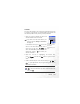
Allows you to use the phone as a
calculator. Use to perform
the mathematical operations
shown on the screen.
You can enter numbers up to
a maximum of 8 digits in
length.
Entered numbers
and calculation
results will appear
in this field.
Press to enter
a decimal point.
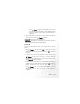
Currency 1:
EUR (euros)
The current exchange
rate setting
Currency 2: USD
(US dollars)
For entering the amount
for conversion
Once you enter the Currency Converter screen, the default currencies
will be displayed, as shown in this example: