
User's Manual Part 2



134 The A520 Tools Gallery CD-ROM
The A520 Tools Gallery CD-ROM
The A520 Tools Gallery provides the cable drivers and software tools
that the phone requires to perform various tasks with the computer.
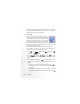
1. Place the A520 Gallery Tool CD-ROM in the computer's CD-ROM
drive. The setup program will automatically start as you close the
drive. Please click on your preferred language.
This auto run setup program only supports Windows® 2000 and XP.