
User's Manual Part 2



136 The WebCam Function
The WebCam Function
You can use the phone as a WebCam. The camera lens on the back of
the phone will serve as the WebCam lens.
1. Install onto the computer the WebCam data cable's driver and
WatchDog required for performing the WebCam function.
Please use the A520 Tool Gallery CD-ROM to install the WebCam
cable's driver and WatchDog (see the installation instructions in the
A520 Tool Gallery CD-ROM).
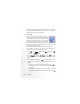
WatchDog will be automatically turned on after installed
successfully. The WatchDog indicator will appear at the
bottom right of the computer screen.