
Owners manual




Introduction14
(Available in Japan region)
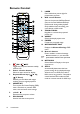
1. ON / OFF
Toggles the projector between standby
mode and on.
2. Source selection buttons
Selects an input source for display.
3. Keystone/Arrow keys ( /▲ Up
,
/▼ Do
wn)
Manually corrects distorted images
resulting from an angled projection.
4. MENU/EXIT
Turns on the On-Screen Displa
y (OSD)
m
enu. Goes back to previous OSD
menu, exits and saves menu settings.
5. ◄
Left/
Decr
eases the projector volume.
6. ECO BLANK
Used to hide the screen picture.
7. ZOOM+/ZOOM-
Magnifies or reduces the pr
ojected
pictur
e size.
8. ASPECT
Selects the display aspect ratio.
9. FREEZE
Freezes the projected image.
10. NETWORK SETTING
Displays the Network Settings
OSD
menu.
11. Numeric buttons
Enters numbers in network settings.
Numeric buttons 1, 2, 3, 4 cannot be
pressed when asked to enter password.
12. NETWORK
Selects Network Display as the
input
s
ignal source.
13. AUTO
Automatically determines the best
picture timings for the displayed image.
When there is no OSD menu and at
MHL source, long press for 3 seconds to
switch between MHL mode and DL
P
mo
de on remote control for MHL keys.
14. ► Right/
Increases the projector volume.
When the On-Screen Display (OSD)
menu is activated, the #3, #5, and #14
keys are used as directional arrows to
select the desired menu items and to
make adjustments.
When MHL function, the #3, #5 and
#14 are used as directional arrows. #4
for MENU/EXIT and #15 for MODE/
ENTER.
15. MODE/ENTER
Selects an available picture setup mode
.
Activate
s the selected On-Screen
Display (OSD) menu item.
16. SOURCE
Displays the source selection bar.
17. PAGE +/PAGE -
Operate your display software prog
ram
(on a connected PC) wh
ich responds
to
page up
/down commands (like Microsoft
PowerPoint).
TEST
5
6
10
15
16
18
21
12
1
2
3
4
13
9
20
14
7
8
17
19
3
11