
- Benq User's Manual Monitor FP231W


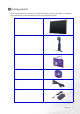
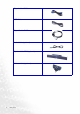
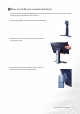
Table Of Contents
- Copyright
- Disclaimer
- Please follow these safety instructions for best performance, and long life for your m...
- Table of Contents
- Getting started
- Getting to know your Monitor
- How to install your monitor hardware
- Getting the most from your BenQ monitor
- How to adjust the screen resolution
- HHow to adjust the screen refresh rate
- How to set the picture optimization
- How to adjust your Monitor
- Troubleshooting
- Supported operating modes
- Specifications

9 How to install your monitor hardware
How to install your monitor hardware
Make sure that the computer and monitor's power are both turned off. Please go along with the
following steps to install your LCD monitor.
3
1. Unpack the package and place the monitor stand firmly.
2. Align the slots on the monitor against the notches on
the monitor stand.
3. Place the monitor on the monitor stand and push it
forward until you hear a clicking sound.