
User's Manual



Acer
Acton Mobile Phone
--
7
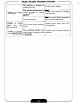
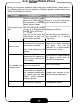
When you encounter problems while using your mobile phone, please refer to
the following table to solve the problem.
If
problem persists, please contact your
dealer immediately for service.
Poor signal recep
-
tion
Echo or noise
The standby time
becomes short
Unable to power
on
You are using your mobile
phone in
a
location (e.g. in
the basement or building)
where signal
is
weak.
You are using your mobile
phone in
a
peak
-
demand
time
(e.g. the rush hour).
You are too far from the
base station of your net
-
work service provider.
Due to the quality of the
network trunk of your net
-
work service provider.
Poor local telephone line
q ua
I
ity.
The standby time can
depend on the system set
-
tings of your network ser
-
vice provider.
The battery may be
at
the
end of
its
service life.
If
the phone can not get
connected to
a
network,
it
will continue searching for
the signal from the base
station, which consumes
battery capacity.
The battery
is
drained.
Move to
a
location where sig
-
nal can be better received.
Make your call later.
You can ask your network ser
-
vice provider for
a
service
range map.
Hang up the phone and then
dial again. You can be
switched to
a
better
-
quality
network trunk or line.
If
you are in
a
location where
the signal
is
weak, turn
off
your phone temporarily.
Use
a
new battery.
Change your location or turn
off your phone temporarily.
Recharge the battery.