
User's Manual
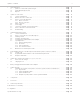

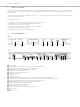
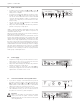
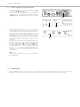
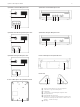
Table Of Contents
- Contents
- 1. Safety Instructions
- 2. Quinta CU Control Unit
- 3. Quinta MU Microphone Units
- 4. Programmable Functions of the Microphone Units with the Quinta Conference Software
- 5. Quinta CD 2 Charger in the Quinta CC 2 | CC 2 / 600 Case and Quinta CD 3 in the Quinta CC 3 Case
- 6. Battery Charging with External Mains Power Adapter
- 7. Trouble Shooting
- 8. Components
- 9. Accessories
- 10. Technical Specifications
- EC-DECLARATIONOF CONFORMITY
- FCC Regulation

Quinta – Microphone Units
10
Opening for unlocking the gooseneck microphone
Connection for gooseneck microphone
Loudspeaker
“Clear” button to clear all delegate microphone units
Microphone button
! Programmable function button
" Reset button to restart the integrated microcontroller (refer
also the item “Microphone unit cannot be switched off” in
chapter 7. “Trouble Shooting”)
# LED strips
Quinta MU 23 Chairman Microphone Unit Quinta MU 33 Chairman Microphone Unit
Quinta MU 22 Double Delegate Microphone Unit Quinta MU 31 Delegate Microphone Unit
Quinta MU 21 Delegate Microphone Unit Bottom of Microphone Unit Quinta MU 33/31
!
Bottom of Microphone Unit Quinta MU 23/22/21
"
!
"
Lateral View
# #