
User's Manual
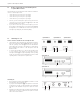
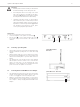
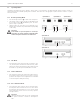
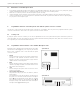
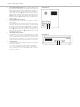
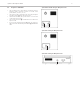

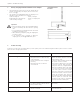
Table Of Contents
- Contents
- 1. Safety Instructions
- 2. Quinta CU Control Unit
- 3. Quinta MU Microphone Units
- 4. Programmable Functions of the Microphone Units with the Quinta Conference Software
- 5. Quinta CD 2 Charger in the Quinta CC 2 | CC 2 / 600 Case and Quinta CD 3 in the Quinta CC 3 Case
- 6. Battery Charging with External Mains Power Adapter
- 7. Trouble Shooting
- 8. Components
- 9. Accessories
- 10. Technical Specifications
- EC-DECLARATIONOF CONFORMITY
- FCC Regulation

Quinta – Microphone Units
12
Function Test
You can test if the microphone units are operating:
• Connect a headphone to the Quinta CU control unit .
• Turn the control to set the volume and press the control
several times until you have listened to all channels (i.e. 4
channels).
Important:
• With the Quinta Conference software you can deactivate
the manual switching off of the microphone unit.
• If the microphone unit is out of range of the control
unit or does not have the correct PIN code, the micro-
phone button will flash red. After approx. 3 minutes
the microphone unit will switch off automatically.
• Should the system fail to operate, i.e. the microphone
unit is switched on, but no sound is heard, check the
audio settings with the Quinta Conference software. If
RF problems occur the microphone button will flash
red. Should the system still fail to operate, please
contact your beyerdynamic representative.
3.5 Powering with CA 2458 Mains Power Adapter
• The Quinta MU microphone units can also be powered via the
external CA 2458 mains charger adapter, which is connected
to the DC socket on the rear of the microphone unit.
• While the CA 2458 mains charger adapter is connected, the
rechargeable battery of the microphone unit is charged. Refer
also to chapter 6. “Battery Charging with External Mains Power
Adapter”.
3.4 Powering / Operating Time
• The microphone units have an integrated rechargeable battery
allowing a minimum operating time of 20 hours when fully
charged.
• When the battery charge is too low for a satisfactory operation,
the operating control LED on the rear of the microphone unit
will flash. The remaining time of operation will be around 60
minutes.
• The charging state of the microphone units can be displayed
with the Quinta Conference software on a PC connected to the
Quinta CU control unit or via the integrated web server.
Furthermore, it can be displayed on an external media control
system connected to the Quinta CU control unit.
Quinta MU 33/31 – Rear View
Quinta MU 23/22/21
Rear View