
User's Manual
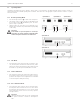
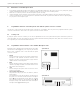

Table Of Contents
- Contents
- 1. Safety Instructions
- 2. Quinta CU Control Unit
- 3. Quinta MU Microphone Units
- 4. Programmable Functions of the Microphone Units with the Quinta Conference Software
- 5. Quinta CD 2 Charger in the Quinta CC 2 | CC 2 / 600 Case and Quinta CD 3 in the Quinta CC 3 Case
- 6. Battery Charging with External Mains Power Adapter
- 7. Trouble Shooting
- 8. Components
- 9. Accessories
- 10. Technical Specifications
- EC-DECLARATIONOF CONFORMITY
- FCC Regulation

Quinta – Microphone Units
15
5. How to Mute Audio IN ports and clear all active delegate units
By pressing the function button a second time, mute is released.
By pressing the function button a third time, the audio input is
muted again and all active delegate units will be cleared etc.
The microphone button will flash red (slowly). When the
chairman turns on his/her microphone, the microphone button
will flash green (slowly). If the chairman turns off priority, the
microphone button will illuminate green should the micro-
phone be still on.
6. How to Mute Audio OUT ports
First push mutes the port, the next one enables it, third one
mutes again etc.
If the chairman presses the function button of his/her micro-
phone unit, the audio output of the Quinta CU control unit will
be muted. The microphone button will flash red (slowly). If
the chairman turns on his/her microphone, the microphone
button will flash green (slowly). If the chairman turns off
priority, the microphone button will illuminate green, should
the microphone be still on.
7. “RS 232 Message” Function
A command is sent via the RS 232 serial interface from the
Quinta CU control unit and a programmed function is carried
out via a media control system for instance (e.g. light control).
At the same time a command is also sent for other functions
via the RS 232 serial interface from the Quinta CU control unit.
8. Command A/B
Two different commands according to the duration of the push
of the function button.
< 1 second = command “Short press string” is transmitted
> 1 second = command “Long press string” is transmitted
These commands can be set individually with the Quinta
Conference software.
!
Quinta MU 23
Quinta MU 33
!