
Operation Manual
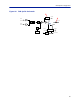
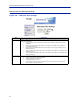

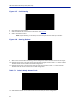
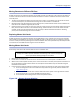
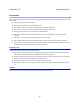
Table Of Contents
- Safety Precautions
- About This Manual
- Table of Contents
- Chapter 1 Introduction
- Chapter 2 System Description
- Chapter 3 Installation guidelines
- Chapter 4 DAS Software Configuration
- Chapter 5 Commissioning
- Chapter 6 RF Commissioning
- Chapter 7 Troubleshooting
- Alarms
- Base Station Gateway (BGW) Alarms
- Fiber Optic Remote (FOR) Alarms
- Remote Unit (RU) Alarms
- Fiber optic Interface (FOI) Alarms
- Base Station Interface (BIU) Alarms
- Medium Power Amplifier (PA) Alarms
- Variable Gain Amplifier (VGA) Alarms
- Analog Pre-distortion (APD) Amplifier Alarms
- Multi-carrier Power Amplifier Interface (MPI) alarms
- Alarms
- Chapter 8 Model Identification

DAS Software Configuration
94
Naming Components
Proper naming of individual components in the DAS is critical to troubleshooting. A recommendation is to start all
component names with their function such as "BIU", "FOI" or "FOR". For example: "BIU-850Sector1".
You may use any combination of alphanumeric characters and the special character of dash "-". Do not use any
other special characters or space.
Note: The name must begin with a letter, the name cannot start with a number or a dash.
0 through 9
a through z
A through Z
-
Component names are limited to 56 characters.
1. Select the component to be named from the Configuration menu.
Figure 105 Component Selection
2. Use the Locate Me button to verify which cards is being accessed.
Figure 106 Locate Me Button
3. Go to Advanced>Netw Setup
4. Enter the new card name in the Host Name field. See
Figure 107
.
5. Select submit.