
Operation Manual
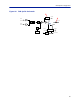
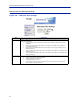

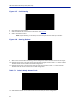

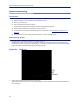
Table Of Contents
- Safety Precautions
- About This Manual
- Table of Contents
- Chapter 1 Introduction
- Chapter 2 System Description
- Chapter 3 Installation guidelines
- Chapter 4 DAS Software Configuration
- Chapter 5 Commissioning
- Chapter 6 RF Commissioning
- Chapter 7 Troubleshooting
- Alarms
- Base Station Gateway (BGW) Alarms
- Fiber Optic Remote (FOR) Alarms
- Remote Unit (RU) Alarms
- Fiber optic Interface (FOI) Alarms
- Base Station Interface (BIU) Alarms
- Medium Power Amplifier (PA) Alarms
- Variable Gain Amplifier (VGA) Alarms
- Analog Pre-distortion (APD) Amplifier Alarms
- Multi-carrier Power Amplifier Interface (MPI) alarms
- Alarms
- Chapter 8 Model Identification

Fiber Distributed Antenna System (Fiber DAS)
95
Figure 107 Unit Naming
6. Go to Advanced > Appl restart.
7. Select the Reboot icon at the bottom of the menu. See
Figure 108
.
8. Select "YES- Restart Process"
Note: After rebooting, it can take up to 5 minutes before the unit shows up in the GUI.
Figure 108 Naming Reboot
9. After all the units have been renamed, go to the Configuration menu and select the correct card type.
10. Highlight all the cards in the right column that had name changes and then select “<<“. Select “Submit”
This will remove the old names from the DAS Configuration.
11. Highlight all the cards in the left column with the new names and then select “>>”. Select “Submit”.
This will move the new card names into the DAS configuration.
Table 71 Submit Newly Named Units
12. Select Network Views > All to confirm that all cards are now part of the configuration.