
Operation Manual



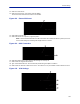


Table Of Contents
- Safety Precautions
- About This Manual
- Table of Contents
- Chapter 1 Introduction
- Chapter 2 System Description
- Chapter 3 Installation guidelines
- Chapter 4 DAS Software Configuration
- Chapter 5 Commissioning
- Chapter 6 RF Commissioning
- Chapter 7 Troubleshooting
- Alarms
- Base Station Gateway (BGW) Alarms
- Fiber Optic Remote (FOR) Alarms
- Remote Unit (RU) Alarms
- Fiber optic Interface (FOI) Alarms
- Base Station Interface (BIU) Alarms
- Medium Power Amplifier (PA) Alarms
- Variable Gain Amplifier (VGA) Alarms
- Analog Pre-distortion (APD) Amplifier Alarms
- Multi-carrier Power Amplifier Interface (MPI) alarms
- Alarms
- Chapter 8 Model Identification

Commissioning
100
Figure 111
Enable
FOI
Optical
Ports
Enable FOI Optical Ports
3. Go to FOI status and note RX Opto power UL.
The laser transmits at 5000 uW. The difference between the 5000 uW transmit level and the receive level is the
loss on the fiber.
Figure 112 RX Optical Power
RX
Optical
Power
a. Starting with software release 3.9, there is an option to have the GUI calculate the fiber loss.
Figure 113 Calculated Optical Loss, Software version 3.9
DL and UL
Optical
Loss