
Operation Manual



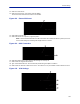


Table Of Contents
- Safety Precautions
- About This Manual
- Table of Contents
- Chapter 1 Introduction
- Chapter 2 System Description
- Chapter 3 Installation guidelines
- Chapter 4 DAS Software Configuration
- Chapter 5 Commissioning
- Chapter 6 RF Commissioning
- Chapter 7 Troubleshooting
- Alarms
- Base Station Gateway (BGW) Alarms
- Fiber Optic Remote (FOR) Alarms
- Remote Unit (RU) Alarms
- Fiber optic Interface (FOI) Alarms
- Base Station Interface (BIU) Alarms
- Medium Power Amplifier (PA) Alarms
- Variable Gain Amplifier (VGA) Alarms
- Analog Pre-distortion (APD) Amplifier Alarms
- Multi-carrier Power Amplifier Interface (MPI) alarms
- Alarms
- Chapter 8 Model Identification

Fiber Distributed Antenna System (Fiber DAS)
105
20. Click on “Status/Statistics.”
21. Select the “Communication Control” tab.
22. Select the check box next to “VPN Restart.”
23. Click “Restart.”
Figure 121
21
22
23
20
VPN Restart
24. After about 10 minutes, the BGW should start communicating with the Bird/DeltaNode CGW.
25. Click on Status/Statistics
26. Select the Ethernet Status tab.
Both "eth0" and "eth1" should show connectivity.
Figure 122
shows good communications in "eth0"
between the BGW and a 3G modem. "eth1" shows good communications between the 3G modem and the
Bird/DeltaNode CGW.
Figure 122 Ethernet Status