
Operation Manual



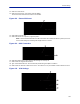


Table Of Contents
- Safety Precautions
- About This Manual
- Table of Contents
- Chapter 1 Introduction
- Chapter 2 System Description
- Chapter 3 Installation guidelines
- Chapter 4 DAS Software Configuration
- Chapter 5 Commissioning
- Chapter 6 RF Commissioning
- Chapter 7 Troubleshooting
- Alarms
- Base Station Gateway (BGW) Alarms
- Fiber Optic Remote (FOR) Alarms
- Remote Unit (RU) Alarms
- Fiber optic Interface (FOI) Alarms
- Base Station Interface (BIU) Alarms
- Medium Power Amplifier (PA) Alarms
- Variable Gain Amplifier (VGA) Alarms
- Analog Pre-distortion (APD) Amplifier Alarms
- Multi-carrier Power Amplifier Interface (MPI) alarms
- Alarms
- Chapter 8 Model Identification

Fiber Distributed Antenna System (Fiber DAS)
107
BGW Configuration
1. Connect IP modem to the External WAN port on the BGW.
2. Click Configuration. See
Figure 125
.
3. Click External Comm.
4. Select 3G-Modem tab.
5. Select the “Use 3G Modem” check box.
Figure 125
2
3
4
5
BGW Configuration - 3G Modem Setup
6. Select the VPN Settings tab.
7. Select the “Activate a VPN service tunnel” check box, if not already selected.
Note: Older software versions of the BGW do not offer VPN service tunnels. Contact Bird to order a
replacement BGW.
Figure 126
6
7
BGW Configuration - VPN Setting
8. Select the DNS Forwarders tab. See
Figure 127 on page 108
.
9. Select either:
"Dynamic, assigned by eth0" or
"Static addresses". Enter 8.8.8.8 in the Forwarding to (DNS1).